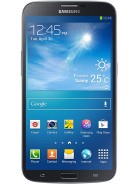
Announced in April 2013, Samsung Galaxy Mega 6.3 is now available for purchase in several countries in the world. The Samsung Galaxy Mega 6.3 - as in a 6.3" Lcd, comes with 3G (GT-I9200) and LTE (GT-I9205) version that runs on Android 4.2.2 Jelly Bean.
Followed by the market rollout, XDA-Developers member VCore has released root method for both I9200 and I9205 version of Galaxy Mega 6.3.
Samsung Galaxy Mega 6.3 users who wish to root their devices, may follow our step-by-step guide.
Disclaimer: Rooting voids the warranty of your device. We and the developer of this rooting procedures shall not be held responsible if any undesirable outcomes may happen to your device. use of this root guide is solely at your own risk!
Pre-requisites
1. Install USB Driver for Samsung Galaxy Mega 6.3 on the computer.
2. Enable USB Debugging Mode on the phone by navigating to Settings >> Developer Options.
3. Make a backup of all your important data before following the guide.
4. The Galaxy Mega 6.3 should be factory unlocked and not locked to any particular carrier.
5. Ensure the battery of the phone is charged more than 80 per cent.
6. The Root Package file works only on Samsung Galaxy Mega 6.3. Applying these to any incorrect variant might brick the device. Verify the model number of the Galaxy Mega 6.3 by navigating to Settings >> About Phone.
Files Required
1. Root Package for Galaxy Mega 6.3 (vcoreroot-v2.tar)
2. Odin 3.07 (Mirror Link)
Steps to Root Galaxy Mega 6.3 Running on Android 4.2.2 Jelly Bean Firmware
Step 1: Extract Odin 3.07 file using WinRAR/7-Zip/WinZip or any other extracting tool.
Step 2: Switch off the Galaxy Mega 6.3. Then boot the device into Download Mode by pressing and holding Volume Down, Home and Power buttons together until a construction Android robot icon with a warning triangle appears on Lcd. Now press the Volume Up button to enter Download Mode.
Step 3: Launch Odin on the computer as an Administrator.
Step 4: Connect the Galaxy Mega 6.3 to the computer using USB cable while it is in the Download Mode. Wait until Odin detects the device. When the device is connected successfully, the ID: COM box will turn blue with the COM port number. Additionally, the successful connected will be indicated by a message saying Added.
Note: If the Added message does not appear, then try re-install USB drivers or changing the port on the computer.
Step 5: In Odin, click the PDA button and select the vcoreroot-v2.tar file.
Step 6: Verify that Auto Reboot and F.Reset Time checkboxes are selected in Odin. Also, ensure the Re-Partition option in Odin is not selected.
Step 7: Double-check and click Start in Odin. The installation process will now begin.
Step 8: Once the installation process is completed, your phone will restart and soon you will see a PASS message with green background in the left-most box at the very top of the Odin. You can now unplug the USB cable to disconnect your device from computer.
Samsung Galaxy Mega 6.3 running on Android 4.2.2 Jelly Bean firmware is now rooted successfully. You can now install any app that requires root permission. Verify the root status of the device by downloading Root Checker app from Google Play Store.
Thanks to all fellas at XDA who first tried out this rooting technique. This method was originally posted via XDA-Developers original thread.
Showing posts with label 6. Show all posts
Sunday, September 21, 2014
Thursday, August 14, 2014
zZ Team Release Huawei Advanced Tool 2 7 0 6 Free Download
zZ-Team Release Huawei Advanced Tool 2.7.0.6! ****ANOTHER DIMENSION****

Previously, all Huawei Unlocked Phones Around the World that Support LTE Networks were unable to get and catch LTE 4G properly, Until Now Unlocked Huawei LTE Phones were only capable to load 3G GSM
But Today and Now on, With this update, Our exclusive and Unique Unlock How to Fix problem for LTE MSM8930, LTE MSM8960 Phones is Capable to Unlock completely your phone, and put it ready to work with conventional SIMCARD 3G Network and with the Newest 4G LTE.
So, Our customers, with phones unlocked by zZKey can enjoy and Unleash the Power of the Faster 4G LTE Network.
When others Stay studing our Lesson on the corner yet, We are Releasing a solution 5 year above the Competition.
JUST ANOTHER DIMESION, TOTALLY FREE and SAFE. ONLY POSSIBLE WITH ZZKEY HUAWEI ADVANCED TOOL.
Whats New:
-------------- Huawei Ascend G526 (Direct unlock now including LTE NETWORK UNLOCK) Worlds First Huawei Ascend G527-U081 (Direct unlock now including LTE NETWORK UNLOCK) Worlds First Huawei Ascend G740-L00 (Orange Yumo) (Direct unlock now including LTE NETWORK UNLOCK) World First Huawei Ascend Y301-A2 - Vitria (Direct unlock now including LTE NETWORK UNLOCK) Worlds First
Huawei Advanced Tool, Module Features Brand: Huawei
Direct Unlock... Supported!
IMEI Repair!! Supported!
Direct Flashing ... Supported!
Relock operation... Supported!
Repair Simlock... Supported!
Read Bootloder Code...Supported!
Direct LTE Unlock... Supported!
Old and New Qualcomm... Supported!
Android New Security... Supported!
MTK... Supported!
Modem... Supported!
zZ Huawei Advanced Tool v2.7.0.6 Download Here
Previously, all Huawei Unlocked Phones Around the World that Support LTE Networks were unable to get and catch LTE 4G properly, Until Now Unlocked Huawei LTE Phones were only capable to load 3G GSM
But Today and Now on, With this update, Our exclusive and Unique Unlock How to Fix problem for LTE MSM8930, LTE MSM8960 Phones is Capable to Unlock completely your phone, and put it ready to work with conventional SIMCARD 3G Network and with the Newest 4G LTE.
So, Our customers, with phones unlocked by zZKey can enjoy and Unleash the Power of the Faster 4G LTE Network.
When others Stay studing our Lesson on the corner yet, We are Releasing a solution 5 year above the Competition.
JUST ANOTHER DIMESION, TOTALLY FREE and SAFE. ONLY POSSIBLE WITH ZZKEY HUAWEI ADVANCED TOOL.
Whats New:
-------------- Huawei Ascend G526 (Direct unlock now including LTE NETWORK UNLOCK) Worlds First Huawei Ascend G527-U081 (Direct unlock now including LTE NETWORK UNLOCK) Worlds First Huawei Ascend G740-L00 (Orange Yumo) (Direct unlock now including LTE NETWORK UNLOCK) World First Huawei Ascend Y301-A2 - Vitria (Direct unlock now including LTE NETWORK UNLOCK) Worlds First
Huawei Advanced Tool, Module Features Brand: Huawei
Direct Unlock... Supported!
IMEI Repair!! Supported!
Direct Flashing ... Supported!
Relock operation... Supported!
Repair Simlock... Supported!
Read Bootloder Code...Supported!
Direct LTE Unlock... Supported!
Old and New Qualcomm... Supported!
Android New Security... Supported!
MTK... Supported!
Modem... Supported!
zZ Huawei Advanced Tool v2.7.0.6 Download Here
Subscribe to:
Posts (Atom)