Thursday, October 23, 2014
Nokia C5 Charger Not Supported Error Problem Solution
This solution may help fix if the Nokia C5 shows "charger not supported error when the battery charger is plug-in. If the error message shows, this probably cause by a faulty hardware components on Nokia C5 PCB board.
Just refer to the solution below and locate the highlighted components for it is part of the charging indication components. Nokia C3 Display Problem Solution - White, blue blank screen displays
 Hints for repair a Nokia C5 charger not supported problem:
1. Try to use another phones battery and charger.
2. Check/clean the battery terminals and connector
3. Check/ replace the 47K resistor as shown on the solution above
Read More..
Just refer to the solution below and locate the highlighted components for it is part of the charging indication components. Nokia C3 Display Problem Solution - White, blue blank screen displays
Nokia C5 Charger Not supported problem solution
1. Try to use another phones battery and charger.
2. Check/clean the battery terminals and connector
3. Check/ replace the 47K resistor as shown on the solution above

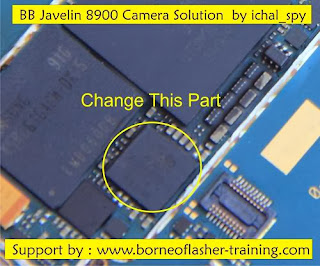
Blackberry 8900 Camera Solution 100 tested solution
blackberry 8900 camera not working open camera show blank solution
blackberry camera not open solution,blackberry 8900 camera have but not open solution,blackberry 8900 camera error not open solution,blackberry 8900 water damage phone camera not open solution start open camera show only display blank solution,blackberry 8900 open camera show camera stand by solution ,blackberry 8900 camera on start hang phone solution blackberry many phone this problem 1st try full wash phone and check few ic 2nd check bluetooth ic chcek this ic and see last my solution
see
blackBerry 8520 sim ways solution 100% tested solution
blackberry 8900 camera not working open camera show blank solution
blackberry camera not open solution,blackberry 8900 camera have but not open solution,blackberry 8900 camera error not open solution,blackberry 8900 water damage phone camera not open solution.Wednesday, October 22, 2014
Factory Reset on Android Device
Factory reset is a very useful default feature which it’s in all Android devices, this feature can be very important in many hard situations, if you made some modifications, or you delete everything from your device, except the Android itself, if you we’ll go and you’ll make a factory reset, your device will look like new.
If you ask yourself “what does a factory reset do?”it’s good to know that, factory reset feature allows you to delete everything on your device (contacts, call logs, SMS messages, applications or data, have also an option to erase all information stored in the memory card (photos, videos, or any type of data stored in memory card).
When you want to sell your Android device Factory reset is a great tool, in this way your buyer don’t can access your private information, another situation when you can use the Factory Reset function it is also if your device begin to move slowly because you have installed many applications, when you make some wrong updates in your device and it’s hard to know what not work correctly, for example some firmware are not compatible with the others and they recommend you to make a Factory Reset.
It’s also very useful when updating to another firmware. Some types of firmware are not compatible with the others and they will require you to do a factory reset.
Be carefully because if you made a factory reset isn’t any way to recover your date after that, if you didn’t do a backup before.
Please note that there isn’t any way to recover data after a factory reset if you didn’t perform backups before.
For make an android backup you will normally need to have a root level access on your Android device and ClockworkMod installed
How factory reset on Android devices ?
It’s very easy to make a factory reset in your Android device:
Settings > Backup & reset > Factory data reset > Reset phone
Note: If you want to erase USB storage, you can check Erase USB storage for make this.
After these operations, please check if in your device it’s on factory parameters and nothing remains on the smartphone.
I made a short video about “how factory reset on Android devices “to see how this thing is done:
Saturday, October 18, 2014
Nokia 2330 Classic Charger Not Responding or Not Supported
when you plug in charger to Nokia 2330 Classic and it indicates a Charger Not Responding or Charger Not Supported notification it can be solve with a few simple steps that i am going to teach in this post.

So Look at the above diagram and try some basic tips and tricks.
Try to change charger in first step and if replacement of charger do not work for solving the problem you can dis assemble Nokia 2330 Classic and then check all these parts that are given in diagrams given in this post.
Clean these parts with electronics cleaner and dry them with hot air.Check these parts with meter and if any of them is not showing proper value it can be solve with applying jumpers.Do not apply much hot air it can harm your skin and can also damage mother board of Nokia 2330 Classic.
for more detail and new tips and tricks about cellphone service problem keep visiting this page we will update cellphone service diagrams timely with new cellphone diagrams.some related post are also given bellow you can read them also for more information about cellphone.
So Look at the above diagram and try some basic tips and tricks.
Try to change charger in first step and if replacement of charger do not work for solving the problem you can dis assemble Nokia 2330 Classic and then check all these parts that are given in diagrams given in this post.
Clean these parts with electronics cleaner and dry them with hot air.Check these parts with meter and if any of them is not showing proper value it can be solve with applying jumpers.Do not apply much hot air it can harm your skin and can also damage mother board of Nokia 2330 Classic.
for more detail and new tips and tricks about cellphone service problem keep visiting this page we will update cellphone service diagrams timely with new cellphone diagrams.some related post are also given bellow you can read them also for more information about cellphone.
Friday, October 17, 2014
How to Use Car Infotainment System on Sony Xperia Z1 Compact
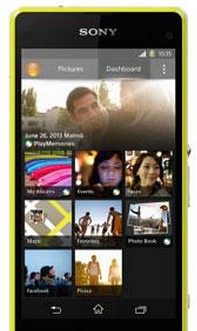 Connect your device to a MirrorLink™ certified car infotainment system using a USB cable to, for example, use a navigation app or play music from your device while driving. The car infotainment system mirrors all features on your device and gives you access to all applications. When connected, you can navigate the apps using the car infotainment system controls.
Some applications may not be available in driving mode. Also, protected data, such as videos that are strictly protected under Digital Rights Management (DRM), is not made available via MirrorLink™.
To connect your device to a car infotainment system
• Connect your device and the car infotainment system using a USB cable. The Lcd of your device appears on the Lcd of the infotainment system.
Warning: You may need to start MirrorLink™ manually if the connection between your device and the infotainment system is not established automatically.
To start MirrorLink™ manually
1. Make sure that your device is connected to the car infotainment system using a USB cable.
2. From your Home Lcd, tap Apps icon.
3. Find and tap Settings > Xperia™ Connectivity > Start MirrorLink™.
4. Tap OK.
Nokia X2 05 Mic problem solution Microphone not working
If mic is not working in Nokia X2-05. Microphone solution with jumpers, Low voice of Nokia X2-05 mic problem solution, Nokia X2-05 mic jumpers to make it solve.Nokia X2-02 Keypad Not Working Problem Solution Jumper Ways

If mic is not working or have a low voice it can be fault of mic and housing. Check Nokia X2-05 housing ( body ). All housing have a small whole at the point of mic. In some cases rust or dust cover this point and the voice can not reach proper to the mic point so make it clean if there is some dust on it.
After dis assembly of Nokia X2-05 look at the motherboard for rust carbon or burn parts. If you found some rust or carbon apply electronics cleaner on the mother board and apply hot air to make it dry proper.
Applying too much heat can damage the mother board and parts.It also can be harm for your skin.So keep in mind about normal heat flow when making it dry.
Remove mic and check all these tracks that are provided in above diagram to solve mic problem in Nokia X2-05. In diagram two different color lines are given to identify all parts that are used to solve Nokia X2-05 mic problem with jumpers.
If some parts are missing or damage apply jumper on these points where small circles are pointing in nokia mic repairing diagram above.
If mic is not working or have a low voice it can be fault of mic and housing. Check Nokia X2-05 housing ( body ). All housing have a small whole at the point of mic. In some cases rust or dust cover this point and the voice can not reach proper to the mic point so make it clean if there is some dust on it.
After dis assembly of Nokia X2-05 look at the motherboard for rust carbon or burn parts. If you found some rust or carbon apply electronics cleaner on the mother board and apply hot air to make it dry proper.
Applying too much heat can damage the mother board and parts.It also can be harm for your skin.So keep in mind about normal heat flow when making it dry.
Remove mic and check all these tracks that are provided in above diagram to solve mic problem in Nokia X2-05. In diagram two different color lines are given to identify all parts that are used to solve Nokia X2-05 mic problem with jumpers.
If some parts are missing or damage apply jumper on these points where small circles are pointing in nokia mic repairing diagram above.
Thursday, October 16, 2014
Nokia 2680s Charging ways
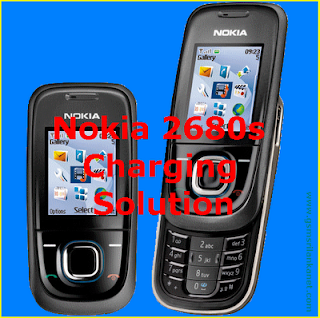
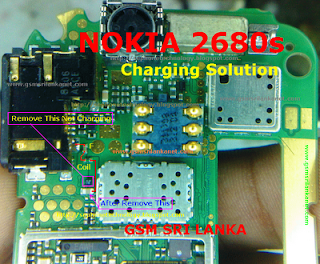
Nokia 2680s Not Charging
Nokia 2680s Charge problem
Nokia 2680s
Subscribe to:
Posts (Atom)