Showing posts with label camera. Show all posts
Showing posts with label camera. Show all posts
Wednesday, November 19, 2014
Nokia 6700s slide camera switch connection tracks

Nokia 6700s slide camera switch connection track

Wednesday, November 12, 2014


Thursday, October 23, 2014
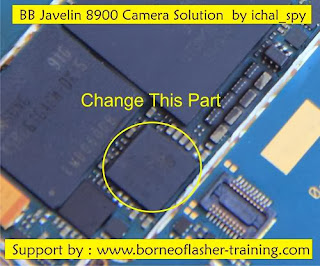
Blackberry 8900 Camera Solution 100 tested solution
blackberry 8900 camera not working open camera show blank solution
blackberry camera not open solution,blackberry 8900 camera have but not open solution,blackberry 8900 camera error not open solution,blackberry 8900 water damage phone camera not open solution start open camera show only display blank solution,blackberry 8900 open camera show camera stand by solution ,blackberry 8900 camera on start hang phone solution blackberry many phone this problem 1st try full wash phone and check few ic 2nd check bluetooth ic chcek this ic and see last my solution
see
blackBerry 8520 sim ways solution 100% tested solution
blackberry 8900 camera not working open camera show blank solution
blackberry camera not open solution,blackberry 8900 camera have but not open solution,blackberry 8900 camera error not open solution,blackberry 8900 water damage phone camera not open solution.Monday, September 15, 2014
Saturday, September 13, 2014
Nokia 1680 camera Problem with Jumper Solution
Nokia 1680 camera solution...100% working..
![Nokia]()
Read More..

Wednesday, September 3, 2014

Thursday, August 28, 2014

Tuesday, August 26, 2014
How To Root UBALK2 Android 4 1 1 Firmware On Galaxy Camera GC100
How to Root UBALK2 Android 4.1.1 Firmware on Galaxy Camera GC100 - If you have updated your Galaxy Camera GC100 to UBALK2 Android 4.1.1 firmware and now want to root it, then follow the guide after the jump.

- You have installed your Camera EK-GC100 USB drivers on your PC.
- You need to enable USB debugging mode which is deactivated by default.
- You camera should have 70-80% charge remaining.
- Backup your important data like Call logs, SMS and other data in stored in phone memory so in case if anything goes wrong, your data is not hurt.
- The update is only meant for Camera EK-GC100, so don’t other to try it on other variants.
- Your Galaxy Camera EK-GC100 should be updated to UBALK2 Android 4.1.1 firmware.
How to Root UBALK2 Android 4.1.1 Firmware on Galaxy Camera GC100???
Step 1) Download CF-Auto Root for Camera EK-GC100.
Step 2) Download ODIN v3.07.
Step 3) Turn OFF your camera.
Step 4) Now you will need to turn it ON in download mode.
Guide: How to Put Samsung Galaxy Camera in Download Mode
Step 5) Now open ODIN on your PC and connect your Camera EK-GC100 to your computer.
Step 5) Once your camera is successfully connected to your PC, the ID:COM box on ODIN will turn yellow and will show the COM port number.
Step 6) Select the downloaded file to install by following below steps:
Click on PDA and select CF-Auto-Root-gd1-gd1xx-ekgc100.tar.md5 file.
Step 7) Again to to ODIN window and check Auto Reboot and F. Reset Time options.
Step 8) Click on Start button in ODIN window to start the installation process. The process will take few minutes to complete.
Step 9) When the installation is completed, your phone will restart.
You are done!
Sunday, August 24, 2014
Samsung i5800 Camera Not Working fix problem

Wednesday, August 20, 2014
Asha 300 Camera Ways how to fix problem

available in the following article. Also you will find Nokia Asha 300
Camera On Standby Ways Jumpers information in the diagrams further in
this post.
In Nokia Asha 300 Camera Not Working problem can occur because of the
faulty Camera Module or it's bad connection to the Cell Phone's
Motherboard. So first of all you should clean Nokia Asha 300 Camera On
Standby Ways and Motherboard of the Mobile Phone. If that does not
work then you can replace the Camera Module.
Note: Small Yellows Lines around the camera Module in First Diagram
represent Camera Connector Legs 6 above and 6 below. Replacing camera
module or camera connector is recommended, Jumper Only if a leg is
broken.
Please Note that we will edit these solutions or add new ones if found
in this page at any time in the future. So feel free to come back any
time on this page to stay up to date.
If you have further Questions please don't hesitate to leave a comment.
Note: Every repairing solution posted here is tested by at least one
member of our team. Use the information available here at Your Own
Risk. We are not responsible if any harm comes to your device during
the repairing process.
Subscribe to:
Posts (Atom)